
See competitor ad spendinside the Meta Ad Library.
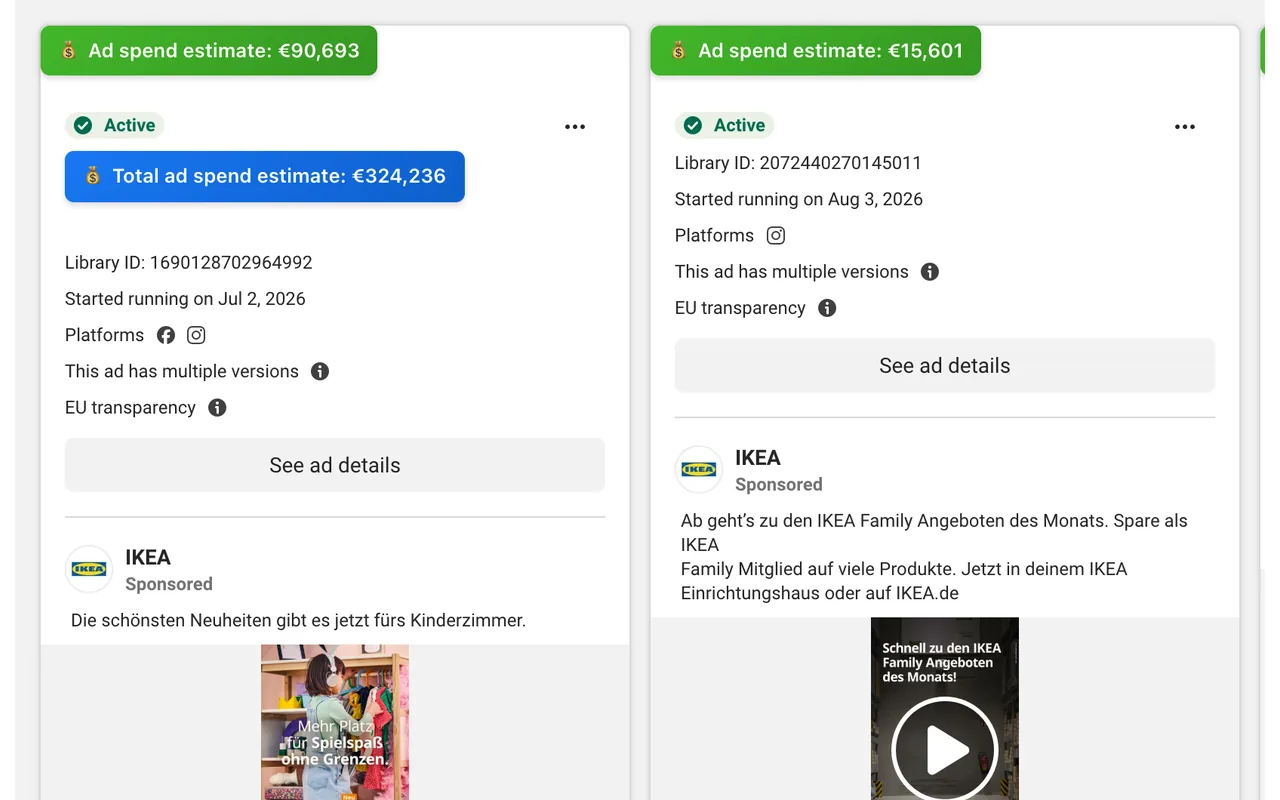
Every ad in the Facebook and Meta Ad Library shows you the creative. None of them show you the money. Our free extension puts estimated ad spend and EU reach on every card, so you can tell a scaled winner from a test in one scroll.
Free forever. No account, no card. Works on ads running in the EU and UK.
Free Chrome extension for the Meta Ad Library
Ad spend on every card
See estimated ad spend per creative, not just impressions.
EU transparency unlocked
Uses Meta's own reach data that is usually buried and hard to read.
Chrome extension, zero setup
Install it, open the Ad Library, scroll. That is the whole process.
WHY IT MATTERS
Competitor ad spend is the only honest signal in the Ad Library .
A creative that has been running for four months on a rising budget is a proven winner. One that ran for six days at €5 a day was a test that failed. The Meta Ad Library presents both identically, so browsing it without spend data means judging other people's advertising on how the image looks rather than how it performs.
That is the wrong basis for a decision. Creative quality is subjective; budget is not. When a brand keeps paying to serve the same ad month after month, it is telling you the campaign works — no marketing team keeps funding a loser. Spending is the closest thing to a public performance metric that competitors ever leak, and reading it turns the Ad Library from a mood board into competitive intelligence.
With budgets attached you can rank an advertiser's creatives from best to worst in seconds, see which hooks and formats they are scaling, watch a campaign ramp in real time, and benchmark your own media investment against the market rather than against a guess. The insights that used to take an analyst a morning take about two minutes once the numbers are on screen, and the strategies your competitors are running stop being a matter of opinion.
HOW TO READ IT
Four things to analyze in a competitor's advertising.
Most advertisers run a long tail of cheap experiments and put the real money behind two or three winners. Sort by spending and that structure appears immediately. The heavily funded ads are the ones worth studying closely — the hook, the first three seconds of the video, the offer, the format.
Watch the same brand across a few weeks and trends emerge. A competitor moving budget from static image content into video is telling you what is working for them. A sudden burst of new creatives usually means a launch; a long quiet stretch on one ad means they have found something that converts and are leaving it alone.
Marketing budgets get argued about in the abstract far too often. Pull the spending of the five brands you compete with and you have a defensible benchmark: what serious players in your category invest to hold their share of the audience, rather than what anyone assumed.
Search a product term rather than a brand and the Ad Library returns everyone bidding for that audience. Some will be names you track; others will be brands you had never considered, quietly buying the same traffic. Spend data separates the serious entrants from the ones running a token campaign.
WHAT YOU SEE
Every data point, on the ad itself.
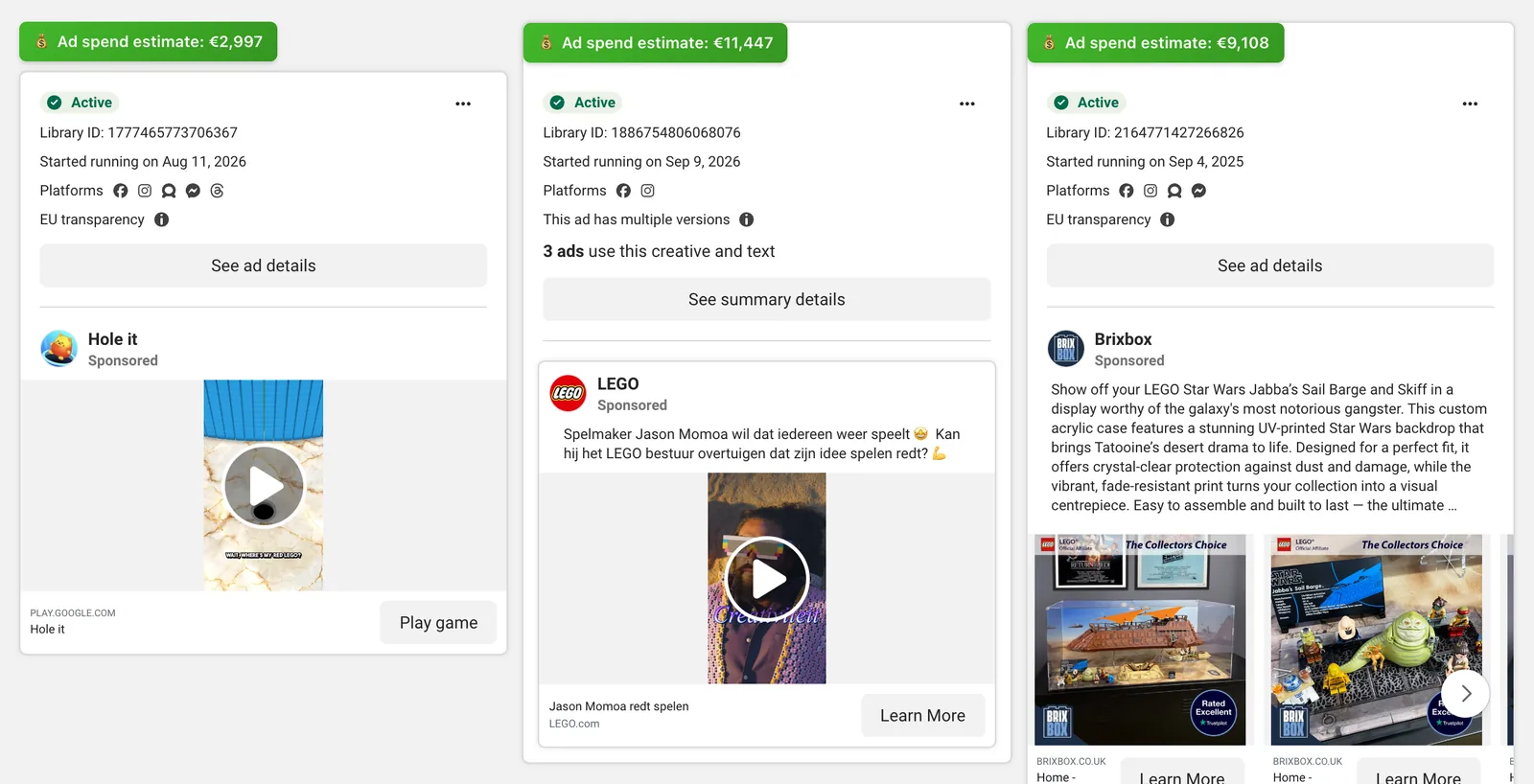
Estimated ad spend
A budget figure on each ad card, so you can sort winners from tests at a glance.
EU reach
How many people the ad actually reached, straight from Meta's transparency data.
Advertiser totals
Combined spending across everything a brand is currently running.
Time on air
How long each creative has been live — the clearest signal of a proven ad.
HOW IT WORKS
From "no idea what they spend" to a clear ad spend estimate in three steps.
Built for marketers who live in the Meta Ad Library. No new dashboards to learn, just richer data directly where you already work.
Search any brand
Open the Meta Ad Library, pick a competitor, and scroll so their ads load.
We read the transparency data
The extension pulls the EU reach figure Meta publishes for each ad and maps it to the creative.
See the money trail
Spot the true winners by ad spend per day, market, and creative format.
WHO USES IT
Built for people who buy media for a living.
Media buyers
Walk into the call already knowing the budget behind a rival campaign, which creatives are carrying it, and where the spending is going up.
Ecommerce and DTC brands
Find which of a competitor's ads are actually scaling before you copy the strategy. The winners fund themselves; the tests quietly disappear.
Agencies
Build a competitive analysis on real numbers instead of screenshots. Clients argue with opinions, not with a market spending benchmark drawn from their own competitors.
THE METHOD, AND ITS LIMITS
Where the numbers come from.
reach ÷ 1,000 × €6
The European Union's Digital Services Act obliges large platforms to publish an ad repository. For Meta that means every ad delivered to an EU audience carries a transparency record including the number of people it reached. Google runs a comparable programme for its own network. The data is public; it is just presented in a way that discourages anyone from using it at scale.
We read that reach figure for each ad and convert it into a spend estimate with a fixed CPM model. Because the input is a real published number rather than a statistical guess, the output tracks reality closely enough to rank creatives and compare campaigns. What it cannot do is tell you an advertiser's exact invoice — no external tool can, and any product claiming otherwise is selling confidence rather than data.
Two honest limits. Ads that never run in the EU have no published reach, so they show no figure. And the estimate is a model, so treat it as a strong directional signal for analysis, not as an accounting record. Everything else — the reach, the dates, the creative, the advertiser — comes straight from Meta.
NEW · ADVERTISER TRACKING
One press of Track, and we watch the brand for you.
The badge tells you what an ad has spent so far. It cannot tell you what changed this week, because Meta keeps no history. So we keep it: press + Track advertiser next to the total on any advertiser page, and we record that brand's ads and spend every day.
Daily spend history
A trendline of estimated daily spend for every brand you track, recorded from the day you press Track.
A verdict, not just a number
Scaling, steady, testing, pulling back or went dark — last week's spend against the week before, once two weeks of history exist.
Alerts on your dashboard
See when a tracked brand launches new creatives, jumps or cuts its spend, or stops running ads.
Every live ad, ranked
All of a brand's live ads in one list, sortable by estimated spend, longest running or newest, with stopped ads one click away.
CSV export
Download any advertiser's ads with reach and spend. Five exports a month free with an account, unlimited on the paid plan.
Up to 100 advertisers
Your whole competitive set in one dashboard. Untrack and swap brands whenever you like.
Try it free for 7 days — no card. Then $39 a month for up to 100 advertisers. See pricing ↓
PRICING
Ad spend is free. Pay only for tracking.
Free
$0
- ✓Spend estimate on every ad in the Meta Ad Library
- ✓Total estimated spend per advertiser
- ✓5 CSV exports a month with a free account
Tracking
$39/month
or $390/year · 7-day free trial, no card
- ✓Track up to 100 advertisers
- ✓Daily spend history and trendline
- ✓Verdict: scaling, steady, testing, pulling back
- ✓Alerts on new creatives and spend jumps
- ✓Unlimited CSV export
QUESTIONS
Frequently asked questions
How do you estimate competitor ad spend?▼
Under the EU Digital Services Act, Meta publishes the reach of every ad delivered to the European Union. That figure sits inside the Ad Library but is buried behind a panel most people never open. Our extension reads it on each ad and converts it into an estimated spend figure using a CPM-based model. The maths is simple and deterministic — no black box, no scraping of private data.
Is this accurate enough to make decisions on?▼
It is directional, and you should use it that way. The estimate is reliable for ranking ads against each other — telling a scaled winner from a test — and for sizing the order of magnitude of a competitor budget. It is not an accounting figure and nobody outside the advertiser has one. If a tool claims exact spend, it is guessing.
Which countries does it cover?▼
Ads delivered to the European Union, plus the UK where a campaign also targets EU audiences. Meta does not publish reach data for US-only or APAC-only campaigns, so those ads show no figure. This is a limit of Meta's data rather than the extension. In practice most serious DTC brands run in at least one EU market, so coverage is broader than it sounds.
Do I need an account?▼
No. The extension is free and works the moment you install it. There is no signup, no credit card and no trial clock. You do not have to make an account to use it. Open the Meta Ad Library and the numbers are already there.
Is there a paid plan?▼
Yes, for one thing the free badge cannot do: history. Meta shows what an ad has reached so far, not how spend moved week to week. Press Track on any advertiser and we record it daily, so you get a spend trendline, a verdict (scaling, steady, testing, pulling back) and alerts when they launch new creatives or jump their budget. It is $39 a month or $390 a year for up to 100 advertisers, with a 7-day free trial and no card to start. The spend badges stay free either way.
Is it against Facebook's rules?▼
No. The Ad Library is a public transparency product that Meta built and publishes deliberately. The extension reads only pages you open yourself and only data Meta already displays. It never touches your Facebook account, your own ad accounts, or any other site.
How is this different from AdSpy, BigSpy or Foreplay?▼
Those are creative libraries — they are very good at collecting and organising ad creatives into a swipe file. None of them tell you the money behind a creative. We do one thing: put an estimated budget on each ad, in the Ad Library, while you scroll. Many people use both.
Does it slow down the Ad Library?▼
No. Results are cached locally on your own device, so revisiting an advertiser is instant. The extension adds a badge to each ad card and otherwise leaves Meta's interface alone.
READY WHEN YOU ARE
See the money trail this afternoon.
Install the Chrome extension, open the Meta Ad Library, and let us do the boring data work for you.
Add to Chrome — freeFree forever · No account · EU & UK ad coverage
Tracking, history & alerts: 7-day free trial